The Ultimate Mega Man X and Zero Webpage - X1 WinAmp Skin
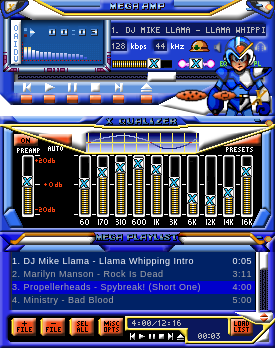
Hello! Thank you for downloading the X Skin from Mega Man X1
for your WinAmp Player. In order to make this skin appear on your
WinAmp Player, here's what you need to do.
Extract all these files into a new folder. Name it "X1" so you
know that the skin files for this skin are in the right place. If you
have WinZip, but don't know how to extract the files, here's how:
In the WinZip with the skin files already open, go to Actions, and then
click "Select All". This will select all the skin files. Now hit the
button that says "Extract" and make sure you have made a new folder
to extract them into, named "X1". Extract the files to that
folder.
Now, go to your main hard drive, look under the Program Files Folder,
go to the Winamp folder, then the skins folder, and place the "X1"
folder there. Open up WinAmp, and select the option menu and go to
"Skins" and select the X1 Skin. It should then autmatically be
your WinAmp skin.
STILL having trouble? Contact me, the webmaster, for personal help and
I will try to answer any questions you have about tyring to install
this skin -
ZeroXPhoenix@hotmail.com
NOTE - This skin is not the property of U.M.M.X.Z.W. but, we still
ask that if you intend to post this skin on your own website, that
credit is given to U.M.M.X.Z.W. in return, and a link to our page
if possible. Thanks!
http://www.classicgaming.com/ummxzw/